Text.com AI Chatbot Review: Hands-On With the 14-Day Trial
Text.com's AI agent is genuinely fast to stand up — it trained itself on a live website in under ten seconds and gave grounded, non-hallucinated answers in our tests, including a clean "I don't know" when we asked something outside its knowledge base. The catch is the trial: it runs 14 days with no card required, but the AI-resolution and API-call caps during the trial are far lower than the paid Growth plan you're evaluated against ($99/user/month). If you already run support through email, WhatsApp, or Instagram, budget time to check Text.com's channel coverage first — several are still marked "coming soon."
How we tested
We signed up for Text.com's free 14-day trial using a dedicated test email (no credit card was requested at signup). Inside the workspace, we worked through Text.com's own "Launch your AI agent in 5 minutes" guide: assigning chats to the default AI agent, training it on a real, live website (this site, Helpdesk Compass, so we could verify the answers ourselves against ground truth), and reviewing the channel and skills configuration. We then ran a series of test conversations against the trained agent — both questions it should be able to answer from the scanned content and one deliberately out-of-scope question — and checked the actual response text. Finally, we opened the billing and usage panels to record the real trial limits and the price and feature list of the plan we'd be moved to once the trial ends, rather than relying on the marketing page. Total hands-on time was roughly 40 minutes.
We did not enter any payment details, place a live order, or send the widget to real site visitors — this is a read-only walkthrough of account setup, AI training, and chat behavior, done from the inside.
We deliberately trained the agent on this site rather than a demo page or sandbox content, because that's the only way to actually check an AI chatbot's accuracy claim: you need to already know the correct answer before you can judge whether the AI got it right. A demo environment stocked with the vendor's own sample FAQ tells you almost nothing about how the tool behaves on messy, real content — ours included navigation text, an About page, and a disclosure page, which is closer to what a small support team's own site looks like than a curated help center would be.
Text.com vs. the AI chatbot competition
Text.com competes in a crowded field of AI-first support tools. We didn't hands-on test Intercom or Tidio for this piece (that's a separate review), but we cross-checked their current public pricing so the comparison isn't just a copy of a vendor's own chart:
| Text.com | Intercom Fin AI | Tidio (Lyro AI) | |
|---|---|---|---|
| Free trial | 14 days, no card required | No free trial; paid plans only | Free plan exists, but Lyro AI is a paid add-on even on it |
| Entry-level price (our test) | Growth plan: $99/user/month after trial | $49/month base + $0.99 per AI resolution (50-resolution minimum) | Starter ~$29/month, but Lyro AI add-on is $39–289/month on top |
| Pricing model | Flat per-user, with AI resolutions bundled into the plan cap | Pay-per-resolution on top of a seat/base fee | Base plan + separate AI usage add-on |
| AI training source (our test) | Website URL scan, ~8 seconds for a small site | Website, help center, PDFs, past conversations | Website, FAQs, files |
| Channels included | Website chat, email, Messenger, Twilio SMS, WhatsApp (SMS/Instagram/Telegram marked "coming soon" at test time) | Chat, email, WhatsApp, SMS via add-ons | Chat, Messenger, Instagram, email |
| Setup time (our test) | Under 10 minutes to a working, trained agent | Typically longer; more configuration surface | Fast for chat widget; Lyro setup is a separate step |
Intercom and Tidio figures are current published pricing as of testing, not our own hands-on trials — treat them as directional, and confirm on each vendor's pricing page before you buy, since AI vendors change usage-based pricing often.
The practical read of that table: Text.com's flat per-user price is easier to forecast than Intercom's per-resolution model, which can swing hard month to month with support volume — useful if your team hates surprise invoices, less useful if your volume is genuinely low and a pay-per-outcome model would actually cost less. Tidio's structure is the one to watch most closely, since its advertised base price doesn't include the AI feature most buyers are actually shopping for; you only see the real cost once you add Lyro on top. Text.com, by contrast, bundles a fixed number of AI resolutions directly into the plan price, so what you see on the billing page during setup is close to what you'll pay going forward, trial-cap caveat aside.
Setting up the AI agent felt closer to "5 minutes" than most onboarding claims
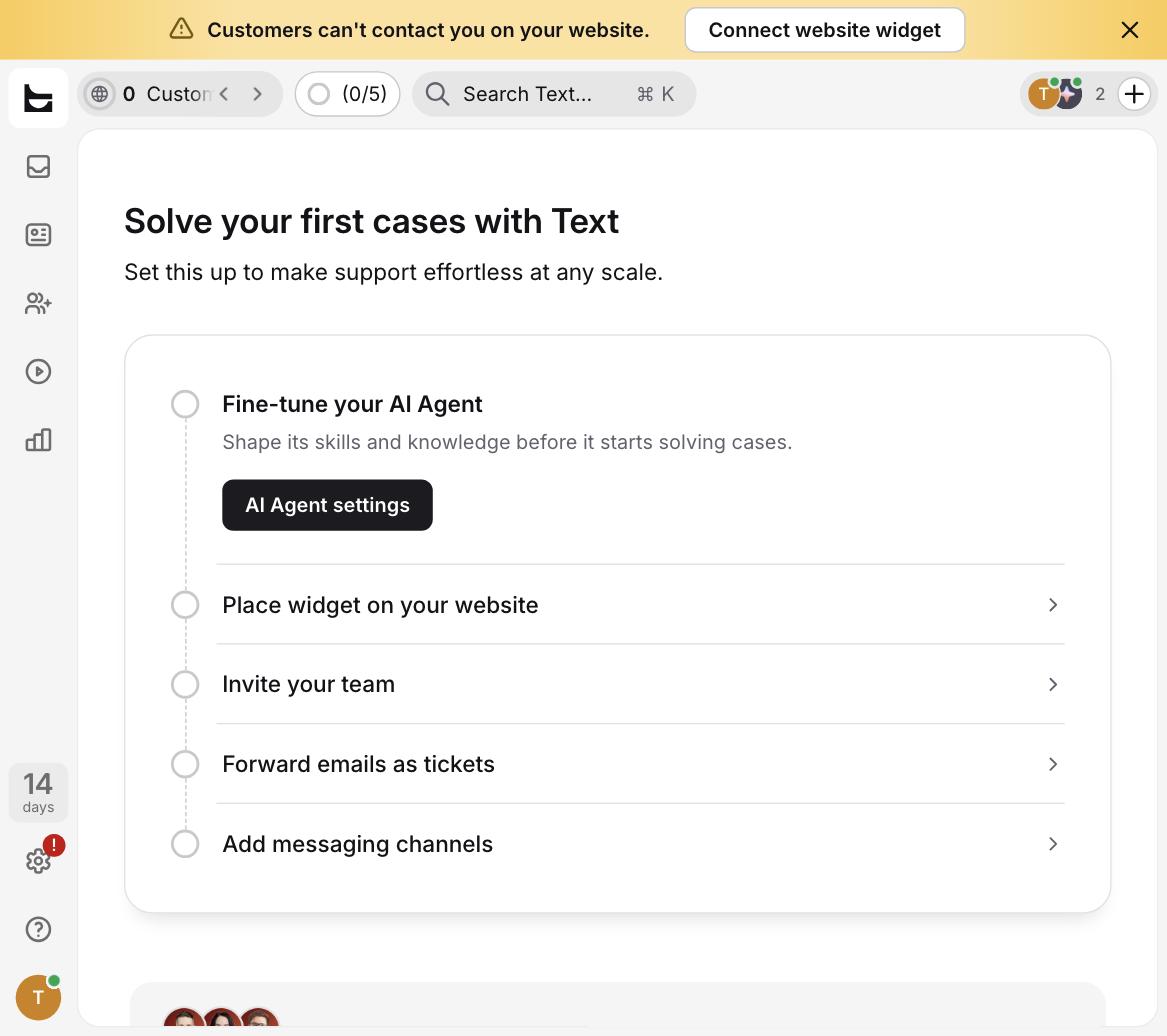
Most SaaS onboarding checklists promise a quick setup and then bury you in configuration screens. Text.com's "Launch your AI agent in 5 minutes" guide was, refreshingly, close to accurate. The trial account started with a default AI agent ("AI Sales Assistant" in our workspace) already assigned to incoming chats — step one was pre-completed. Step two, training the agent, asked for either a website URL or uploaded files.
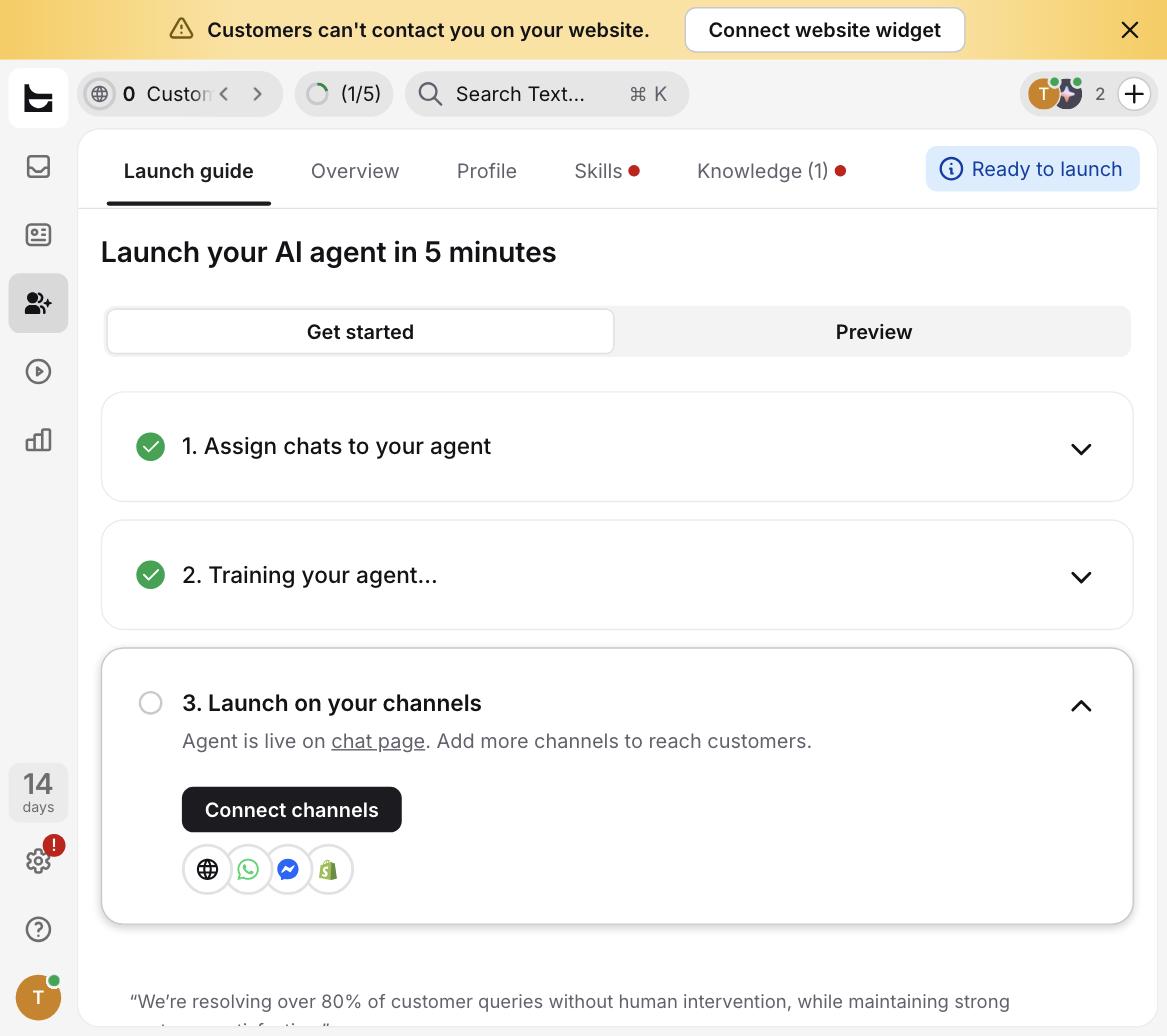
We entered our own site's URL and clicked "Agree and scan." Text.com's dialog is upfront that "some websites limit AI access" and that scanning requires the site to allow it — a fair warning for anyone testing against a site with aggressive bot-blocking. For our small test site, the scan completed in well under 10 seconds, and the "Knowledge" tab immediately showed one trained source.
Worth noting for anyone comparing plans: our trial workspace shipped with two distinct AI entities, not one — the customer-facing "AI Sales Assistant" we trained and tested throughout this review, and a separate internal "Copilot" listed alongside it under Team → AI Agents. Text.com doesn't surface much explanation of Copilot inside the trial flow itself, but based on the sidebar grouping it appears to function as an agent-assist tool for your human support staff rather than something a customer would talk to directly. If you're evaluating Text.com specifically for a customer-facing chatbot, make sure you're testing and training the right one — it's easy to assume "AI agent" means a single thing when the product ships with at least two.
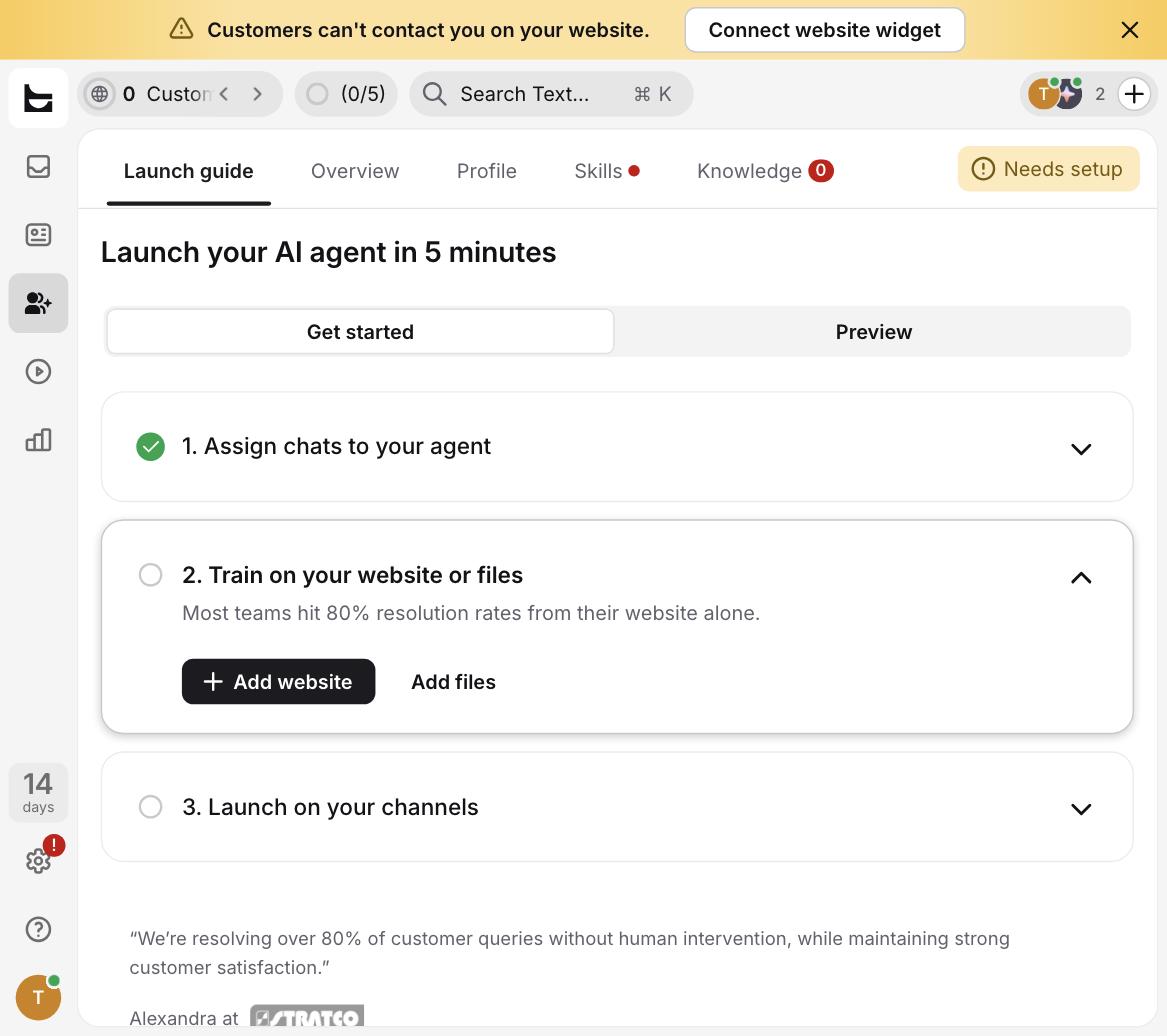
Step three, launching on channels, is where the trial's real limitation showed up. The agent goes live automatically on Text.com's own hosted "chat page," but connecting it to your actual website widget, WhatsApp, or Messenger requires additional setup — and a persistent banner in the dashboard reminded us the whole time that "Customers can't contact you on your website" until the widget was connected. If your test plan is "install this in an afternoon and see live traffic," budget extra time for the widget and channel connection step specifically, not just the AI training.
We asked it real questions — it didn't make things up
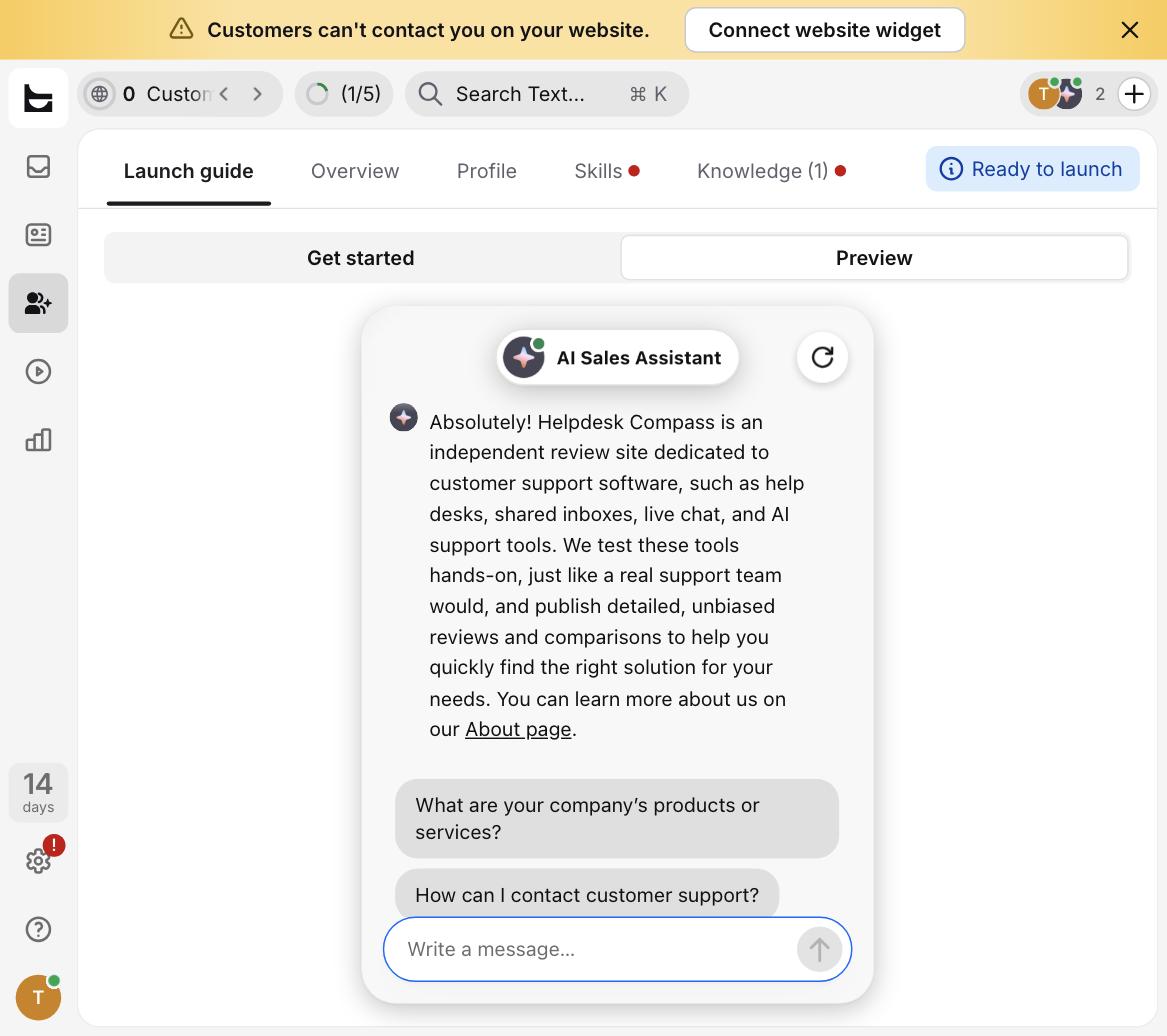
The part we cared about most wasn't the setup speed, it was whether the trained AI would actually answer correctly, and whether it would hallucinate when it didn't know something. We opened the built-in "Preview" chat and asked two questions.
First, an in-scope question: "What does Helpdesk Compass do?" The agent answered correctly and specifically, describing the site as "an independent review site dedicated to customer support software" that tests tools "hands-on, just like a real support team would," and linked to the About page — all pulled accurately from the scanned content, with no invented details.
Second, we deliberately asked something the site has no information about: "What is your refund policy for orders placed last week?" This is the kind of question that trips up a lot of AI chatbots into inventing a plausible-sounding but false policy. Text.com's agent didn't do that. It correctly stated that the site "doesn't process sales or transactions," that there is no refund policy to speak of, and redirected to the site's contact address instead of fabricating an answer.
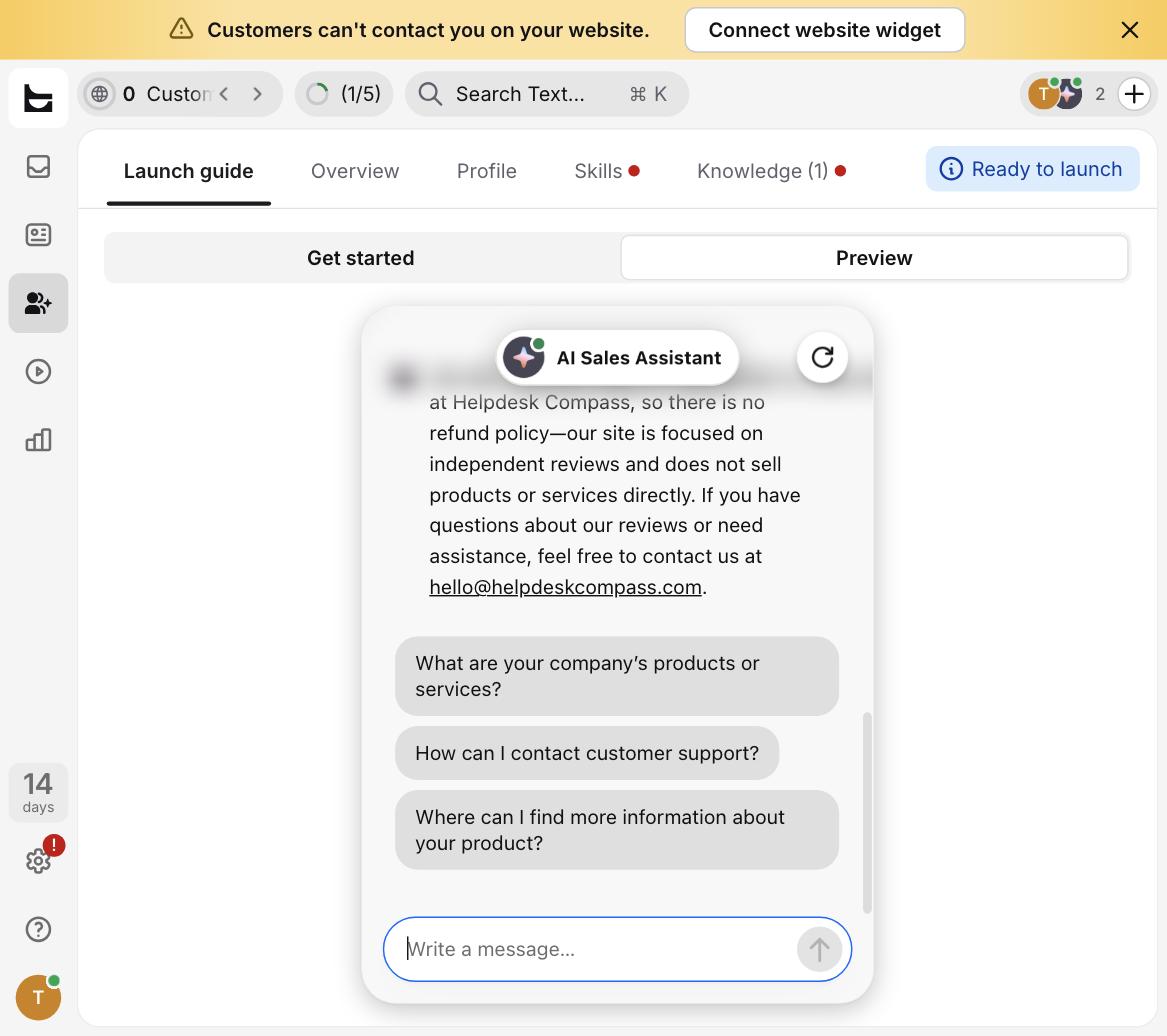
That's a meaningfully better result than we expected from a same-day trained agent with a single knowledge source. It suggests Text.com's retrieval is grounded tightly enough to the scanned content that it resists the temptation to guess — which matters more for support quality than almost any other feature on the pricing page.
Customizing behavior: skills are prompt-based, not just toggles
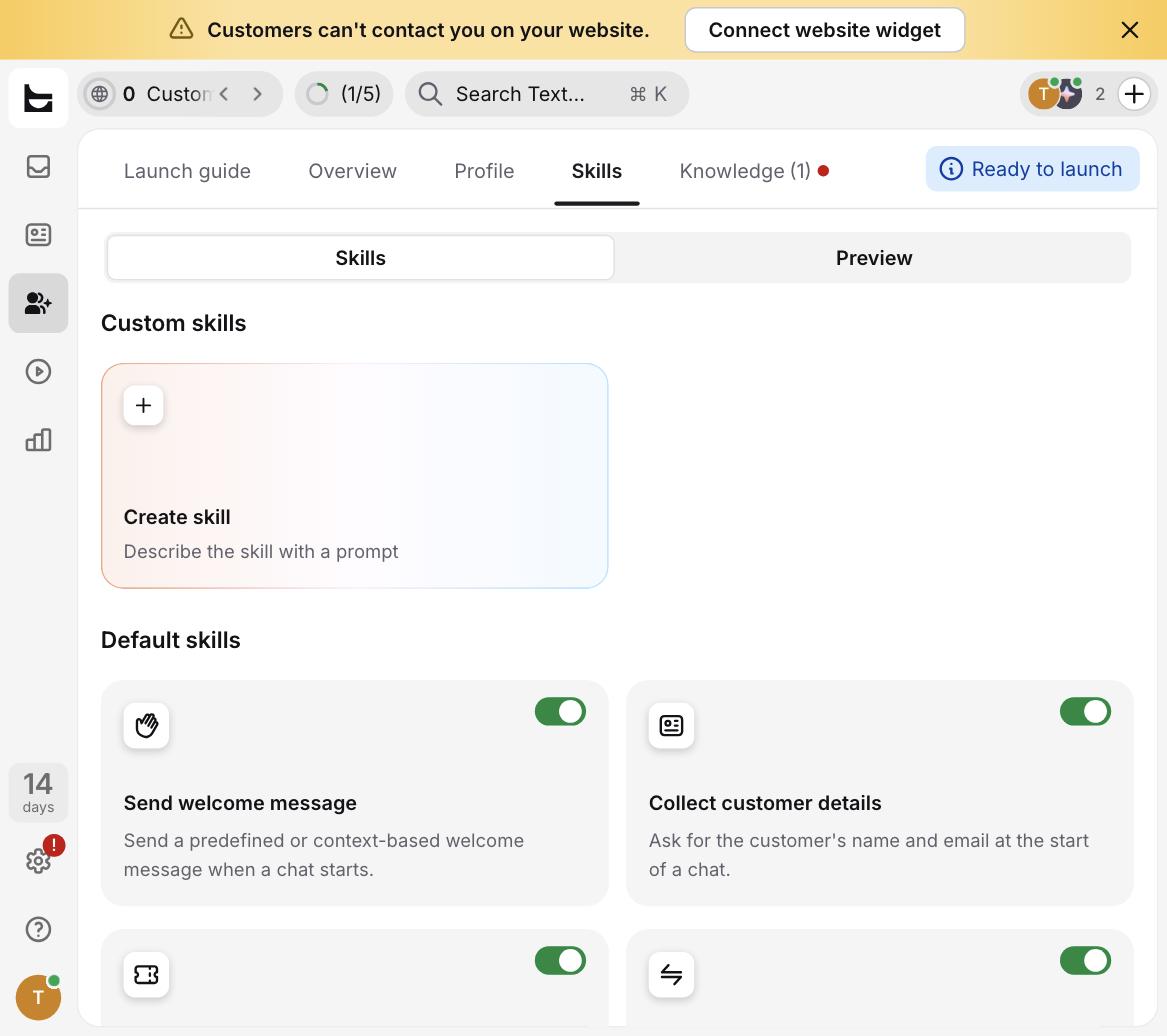
Beyond training, Text.com lets you shape agent behavior through "Skills" — a mix of built-in toggles (send a welcome message, collect a customer's name and email at the start of a chat, hand off to a human) and a "Create skill" option where you describe a custom behavior in a prompt rather than configuring it through a form. For teams that want the AI to follow a specific script — say, always asking for an order number before answering shipping questions — this is a lower-friction path than most competitors' rule builders, though we didn't stress-test a complex multi-step custom skill in this trial window.
What the trial actually includes — and what changes once you pay
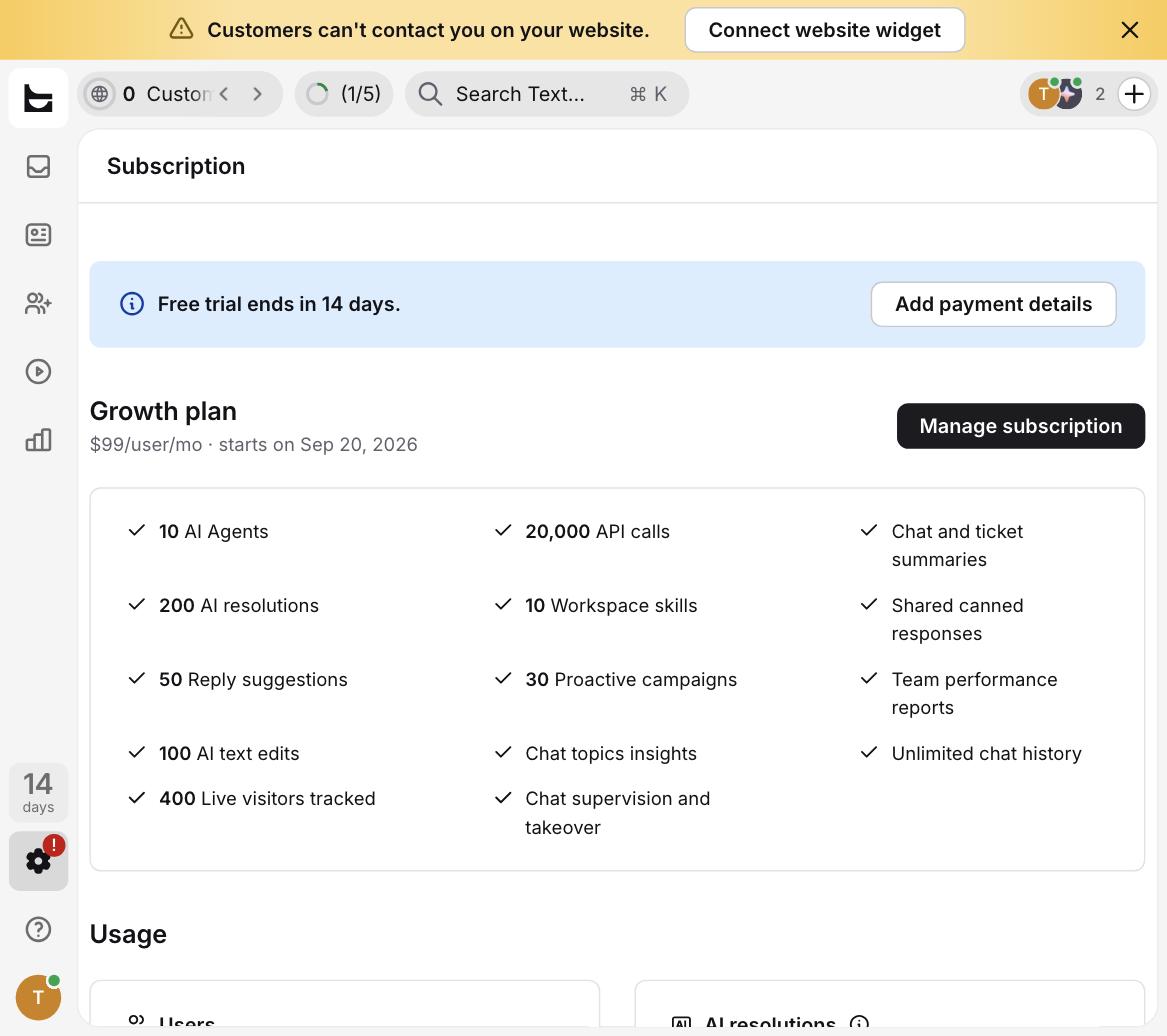
This is the part most reviews skip: what you're testing during the free trial is not identical to what you'd get on day one of a paid plan. Text.com's billing panel was direct about it. Our trial account is scheduled to convert to the Growth plan — $99 per user per month — on day 14, and that plan's advertised feature list includes 10 AI agents, 200 AI resolutions, 50 reply suggestions, 100 AI text edits, 400 tracked live visitors, 20,000 API calls, 10 workspace skills, 30 proactive campaigns, chat and ticket summaries, shared canned responses, and unlimited chat history.
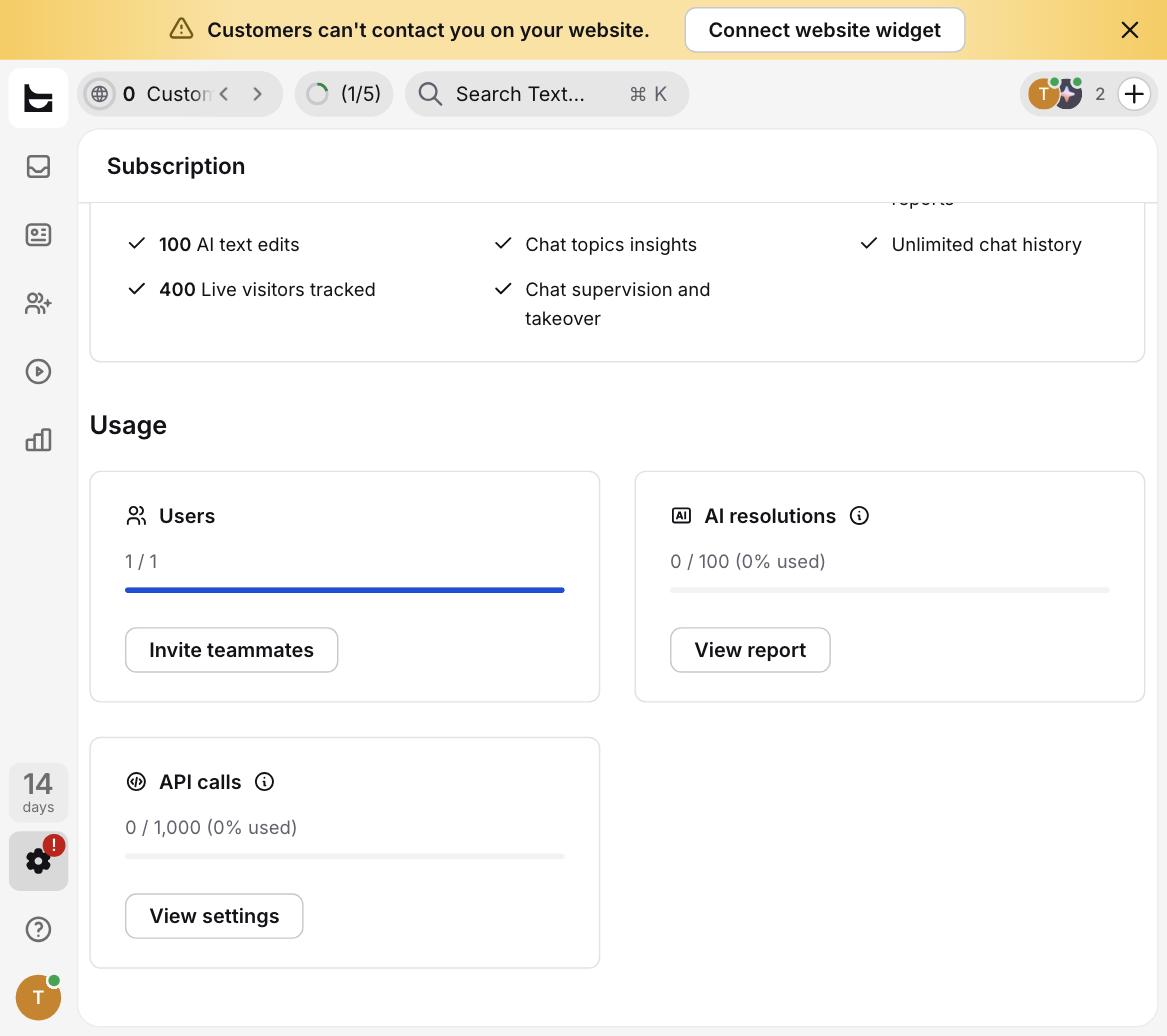
But the trial's actual usage panel told a different story than the plan card: our account was capped at 100 AI resolutions and 1,000 API calls for the trial period — half the resolutions and a fraction of the API calls listed for the Growth plan itself. In other words, the number you're shown on the pricing page is what you get after you pay, not necessarily what you're evaluating during the free trial. If your test plan involves pushing meaningful chat volume through the AI agent to judge its resolution rate, know that you may hit trial caps before you've gathered a representative sample.
On the affiliate side (disclosed above and in full on our How we test page), Text.com's public partner program pays 20–22% recurring commission for the life of the referred customer, with a 120-day cookie window — one of the more generous recurring structures we've seen among the help-desk and live-chat tools we track. We're noting the rate for transparency, not as a reason to recommend the product; our verdict above is based entirely on the hands-on test.
Who should NOT buy Text.com
Text.com's AI agent impressed us on accuracy and setup speed, but it's not the right fit for everyone:
- Teams that need Instagram, Telegram, or native SMS today. At the time we tested, these channels were listed as "coming soon" in the channel settings — WhatsApp and Twilio SMS work, but if your support volume lives on Instagram DMs, you'll be waiting on the roadmap.
- Anyone planning to load-test the AI's resolution rate during the trial. The 100-resolution trial cap (versus 200 on the paid Growth plan) means a busy support team could exhaust the evaluation budget within a few days of real traffic, before getting a statistically useful read on accuracy across their own ticket variety.
- Solo founders or very small teams price-sensitive on a per-user basis. At $99/user/month for the Growth plan, a two-person support team is looking at roughly $2,376/year before add-ons — competitive against Intercom's usage-based model at moderate volume, but a real commitment for a bootstrapped shop, especially compared to tools with a genuinely usable free tier.
- Teams that need the AI live on their own website widget from day one. The agent auto-activates on Text.com's hosted chat page, but getting it onto your actual site requires the separate widget-connection step — not a dealbreaker, but not instant either, and the dashboard's persistent warning banner underlines that this step is easy to leave undone.
Bottom line
Text.com's biggest strength in our test wasn't a feature on the pricing page — it was restraint. The AI agent answered what it knew accurately and declined gracefully rather than guessing when a question fell outside its trained knowledge, and it got there from a website scan that took seconds, not hours of manual FAQ entry. That's the hard part of AI support tools to get right, and Text.com got it right in our test. Where it's worth going in with eyes open is the gap between the trial's usage caps and the paid plan's advertised limits, and the channel roadmap gaps if your support already lives on Instagram or native SMS. For a team that primarily needs website chat, email, and WhatsApp covered by a fast-to-train AI agent, and that's comfortable evaluating on a 100-resolution trial budget, Text.com is worth the 14 days it costs you to find out.