BoldDesk vs Freshdesk: Compared for Small Teams (2026)
At the entry tier, BoldDesk and Freshdesk cost almost the same per agent — but the similarity ends there. BoldDesk bundles deep automation (200 rules) and a full AI Center into its $99/month, 5-agent floor, which we confirmed hands-on in a live trial workspace. Freshdesk prices strictly per agent starting at $19/agent/month, which is cheaper for teams of one to four, but it keeps multiple SLA policies and AI Copilot behind its Pro tier and a paid add-on respectively — that part comes from Freshworks' own pricing page and docs, since we were not able to complete Freshdesk's own account verification during this testing window. If you're under 5 agents, price out Freshdesk Growth first. At 5 or more, BoldDesk's flat tier is worth a serious look.
How we tested — and why Freshdesk is docs-only here
We have hands-on tested BoldDesk; Freshdesk details are drawn from official documentation and pricing pages (not yet hands-on tested by us). For BoldDesk, we signed into a live Enterprise-trial workspace, opened and replied to a real ticket, built a create-ticket-triggers automation rule from scratch, walked through the AI Center and Admin Center, and cross-checked every number below against BoldDesk's own current pricing page. For Freshdesk, our account setup this cycle didn't go through in time to test hands-on, so nothing in this article claims first-hand use of the Freshdesk product — every Freshdesk figure and feature claim here is sourced from Freshworks' public pricing page and its support documentation, and we've labeled it that way throughout rather than passing it off as something we used ourselves.
That's an unusual way to publish a head-to-head, and we're flagging it rather than hiding it: treat the BoldDesk sections as first-hand testing, and the Freshdesk sections as a careful reading of the vendor's own current published numbers. We'll update this piece with hands-on Freshdesk screenshots once we're through their account setup.
| BoldDesk | Freshdesk | |
|---|---|---|
| Hands-on tested by us | Yes | Not yet — docs & pricing page only |
| Pricing model | Flat, per-team-size tiers | Per agent, three tiers |
| Entry price | $99/mo for 5 agents (annual) | $19/agent/mo (Growth, annual) |
| Free plan | No — trial only | No standalone free plan on current pricing page — 14-day trial only |
| Trial length | 15 days, no card (our workspace was a longer sales trial) | 14 days, starts on Enterprise-tier features |
| Automation cap (our check) | 200 rules per account | Not disclosed on pricing page as a hard number |
| AI included at entry tier | 500 AI credits/mo — first 3 months only | 500 Freddy AI Agent sessions/mo (Growth); agent-side AI Copilot is a $29/agent/mo add-on |
| Multiple SLA policies | Included (all tiers, per our test account) | Pro tier and up (not on Growth) |
Freshdesk figures are current published pricing and documentation as of our check, not a hands-on trial — confirm directly with Freshworks before you buy.
Pricing: BoldDesk's floor vs Freshdesk's per-seat math
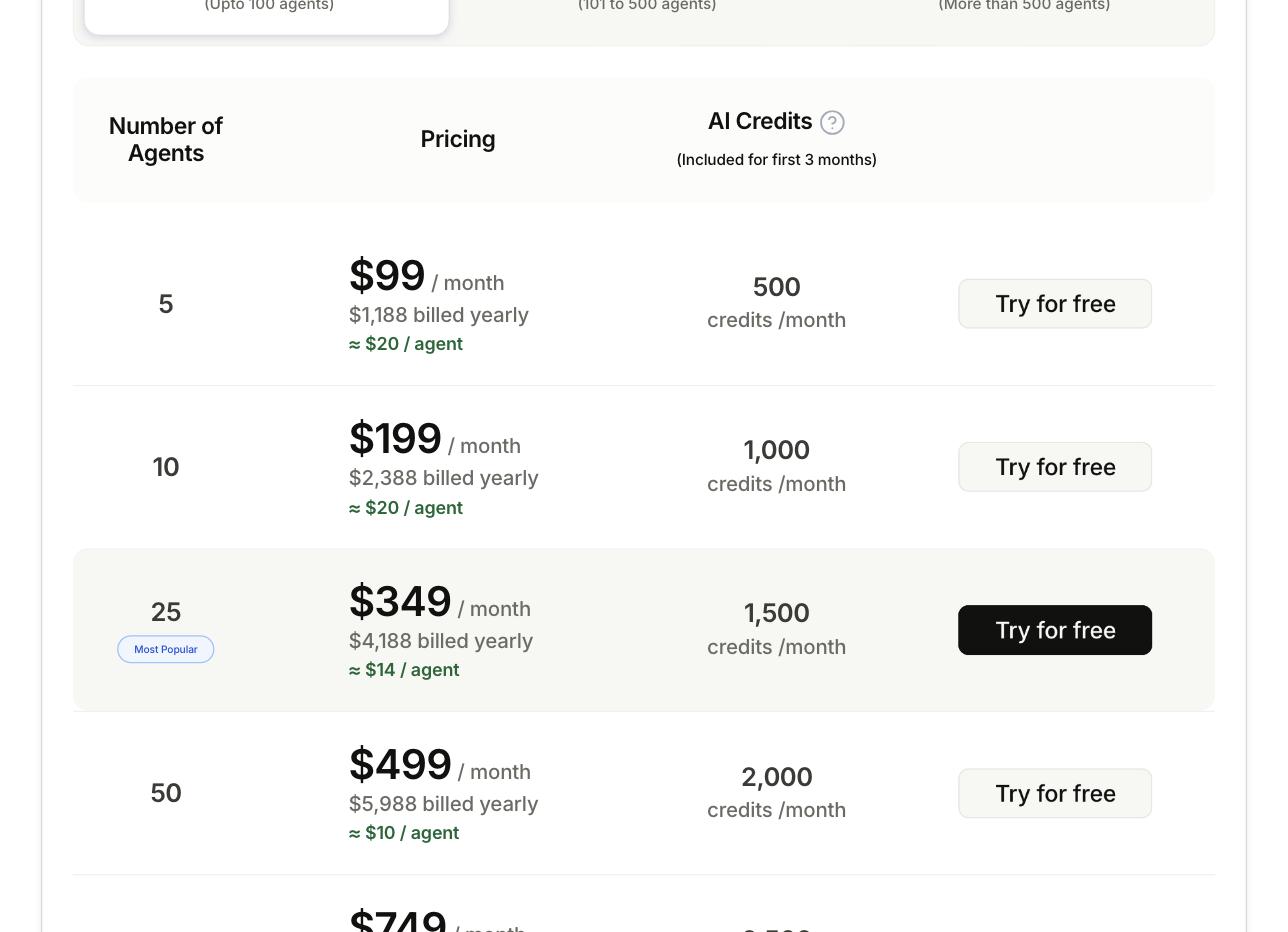
This is the part most comparison posts get lazy about, so we did the actual arithmetic. BoldDesk doesn't sell per-agent seats below its tier floor — the cheapest published tier is $99/month (billed annually) and covers up to 5 agents, whether you're using one seat or all five. Freshdesk's Growth plan is a true per-agent price: $19/agent/month, billed annually, no minimum team size.
Run the numbers at a few team sizes and the picture gets interesting:
- 2 agents: Freshdesk Growth costs $38/month. BoldDesk still bills $99/month, because there's no tier under 5 agents — you're paying for three empty seats.
- 5 agents: Freshdesk Growth costs $95/month, almost exactly BoldDesk's flat $99/month. At this size the two are basically tied on price — the decision comes down to which feature set you actually need.
- 10 agents: BoldDesk's next tier is $199/month (about $19.90/agent). Freshdesk Growth is $190/month for the same headcount — still a near-match.
Where the two products actually diverge is what that entry price buys you. BoldDesk's $99 tier ships with the automation and AI Center we describe below, no separate purchase needed. Freshdesk's $19/agent Growth tier is ticketing, a shared inbox, a customer portal, a knowledge base, and 500 Freddy AI Agent sessions — but multiple SLA policies, custom dashboards, intelligent routing, and multilingual support all require stepping up to Pro at $55/agent/month, and agent-facing AI Copilot is a further $29/agent/month on top of that, on any tier. Run a 5-agent team on Freshdesk Pro with Copilot and you're at $55 + $29 = $84/agent/month, or $420/month total — more than four times BoldDesk's flat $99 for the same headcount. If your team needs Pro-level routing and Copilot, run that math before assuming Freshdesk is the cheaper option; if Growth's feature list is genuinely enough for you, it's the better deal below 5 agents and roughly a wash at 5–10.
Freshdesk also offers month-to-month billing without the annual commitment, at a markup on all three tiers — BoldDesk does the same: our checked pricing page listed $124/month month-to-month for the same 5-agent tier that's $99/month on annual billing, an 18-20% premium for flexibility either way.
Free plan and trial: neither one is actually free
It's easy to assume Freshdesk still has the generous free-forever plan it built its early reputation on. As of our check, Freshworks' own pricing page does not list a standalone free plan at all — what it offers is a 14-day trial that starts you directly on Enterprise-tier features, full stop. Some third-party pricing roundups reference a separate "Free Program" limited to one or two agents for six months, but that isn't what shows up on Freshworks' core pricing page, so treat it as something to ask sales about directly rather than something you can self-serve sign up for today.
BoldDesk never claimed to be free in the first place — it's trial-only, 15 days with no credit card required on the public signup flow. Our test workspace was a longer Enterprise sales trial, and the first thing we noticed logging in wasn't a feature, it was a banner: "Outgoing emails are blocked for your account. Please contact BoldDesk support team." That's a real limitation worth planning around — if part of your evaluation involves testing actual email delivery to customers, you'll need to get that unblocked with support before you can, and it isn't automatic on a fresh trial.
Automation and AI: what's bundled vs what's an add-on
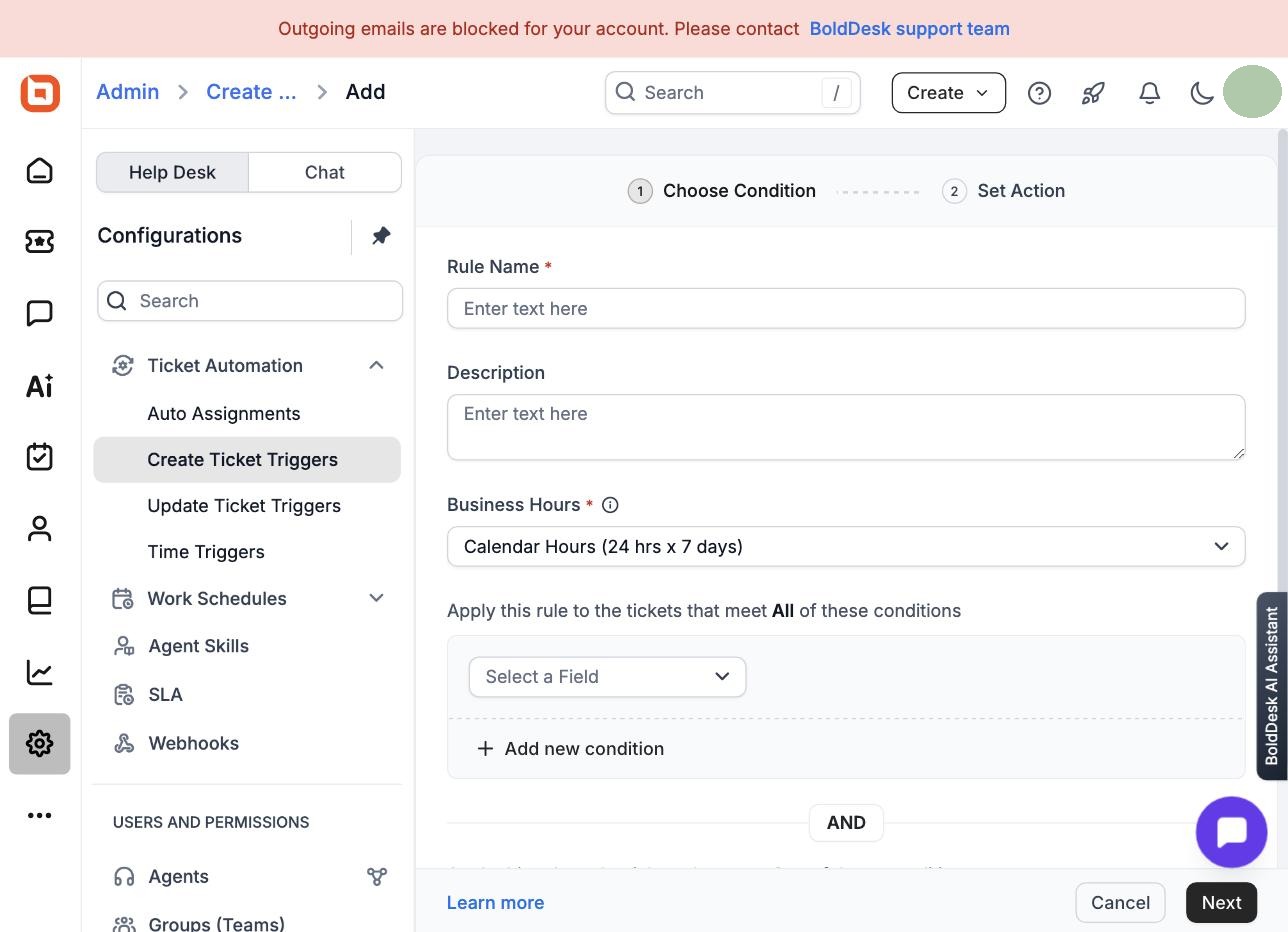
BoldDesk's Admin Center has a dedicated "Automation" section — Auto Assignments, Create Ticket Triggers, Update Ticket Triggers, Time Triggers, Business Hours, Holiday List — sitting next to a separate "AI Automation" section for AI Agent Assignment and AI Trigger Orchestration. We opened the Create Ticket Triggers builder and stepped through it: choose match-all/match-any conditions on any ticket field, then set the resulting actions. Our account's cap was 200 rules total, which is far more headroom than a small team is likely to use.
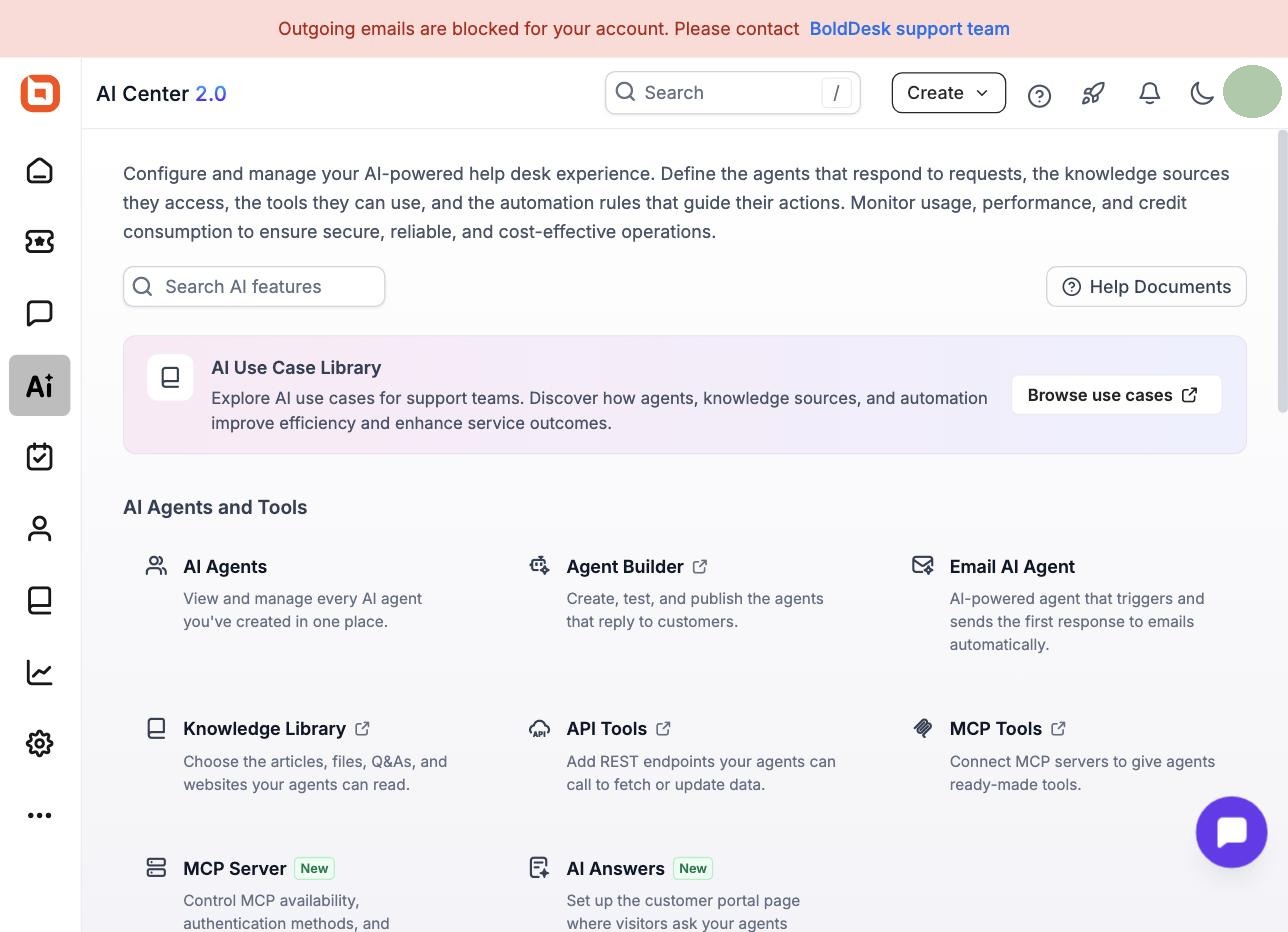
The AI side goes deeper than a single toggle. BoldDesk's "AI Center 2.0" bundles AI Agents (manage every agent you've built), an external Agent Builder, an Email AI Agent that auto-drafts first responses, a Knowledge Library, API Tools, MCP Tools for connecting external systems, and a customer-facing "AI Answers" self-serve widget — all visible and configurable on our entry-tier trial account. The catch, and it's a real one: the 500 AI credits per month that come with the 5-agent tier are, per BoldDesk's own pricing page, a "limited-time offer" included for the first three months from your subscription start date only. What happens to AI usage after month three isn't spelled out on the pricing page — that's a direct question to put to BoldDesk sales before signing an annual contract, not something to assume continues indefinitely.
Freshdesk's AI story is structured differently, and — per its own documentation — split across two products under the "Freddy AI" brand. Freddy AI Agent handles customer-facing bot conversations, with 500 sessions per month bundled into Growth and up, and additional sessions sold in packs of $49 per 100. Freddy AI Copilot is a separate, agent-facing assistant that isn't bundled into any tier's list price — it's a flat $29/agent/month add-on regardless of whether you're on Pro or Enterprise. So a Freshdesk team that wants both a customer-facing bot and an AI assistant for their own agents is paying the per-agent plan price plus $29/agent/month on top, every month, with no free window — a different tradeoff from BoldDesk's "everything's in, but only for three months at this credit level" structure. Neither approach is free of gotchas; they're just different gotchas, and both are worth budgeting for rather than assuming from the sticker price. If what you actually need is a customer-facing AI chatbot rather than a full ticketing system with a bot bolted on, it's worth comparing both against a chat-first tool — we put Text.com's AI agent through its own hands-on trial and it answered accurately on trained content, which is a different bar than either help desk's bundled bot is trying to clear.
Ticket handling: what we actually clicked through in BoldDesk
Since Freshdesk isn't hands-on here, this section is BoldDesk-only — for how Freshdesk's ticket screen and settings are laid out, its own product documentation covers that in more useful detail than we could from the outside.
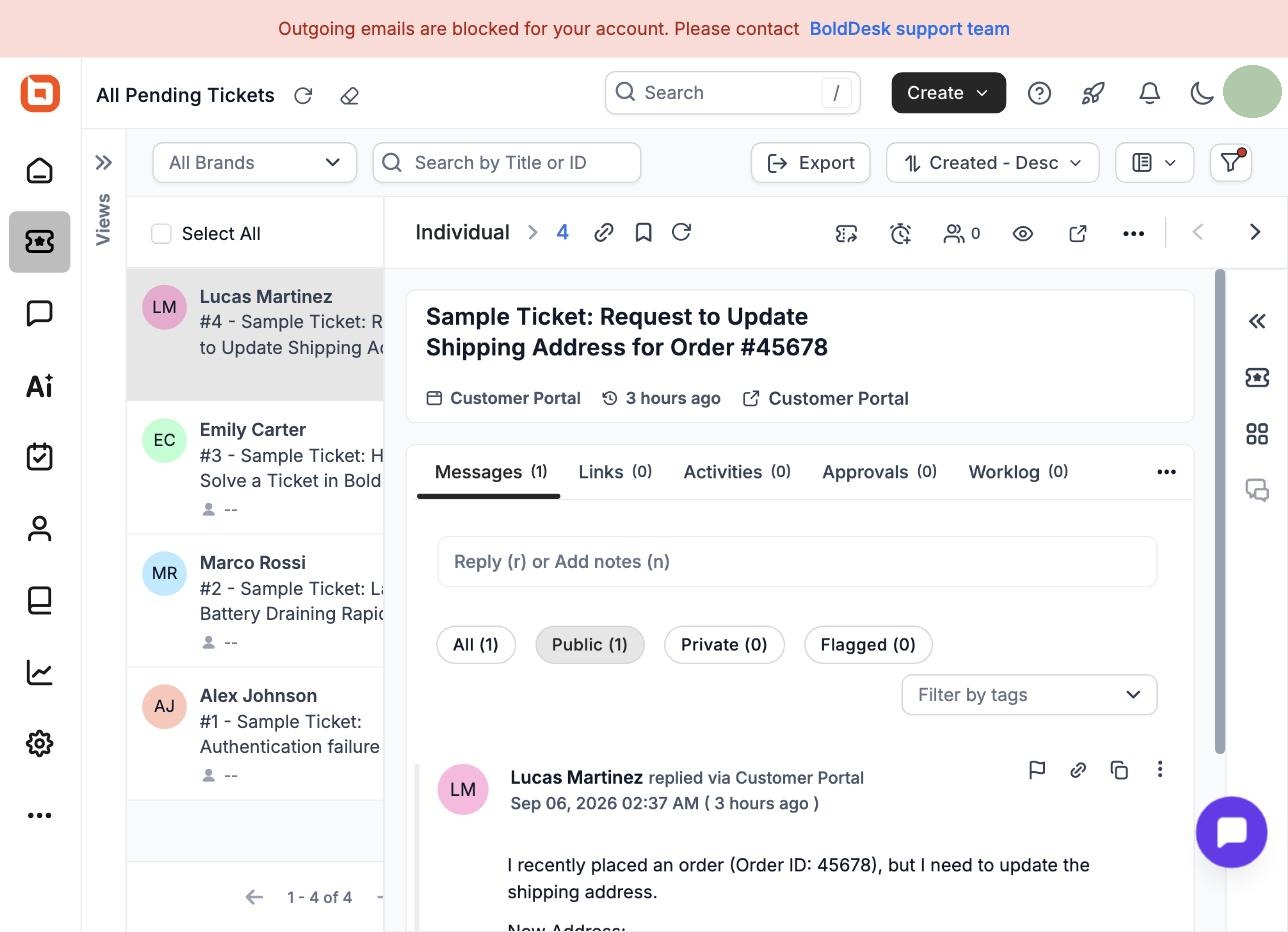
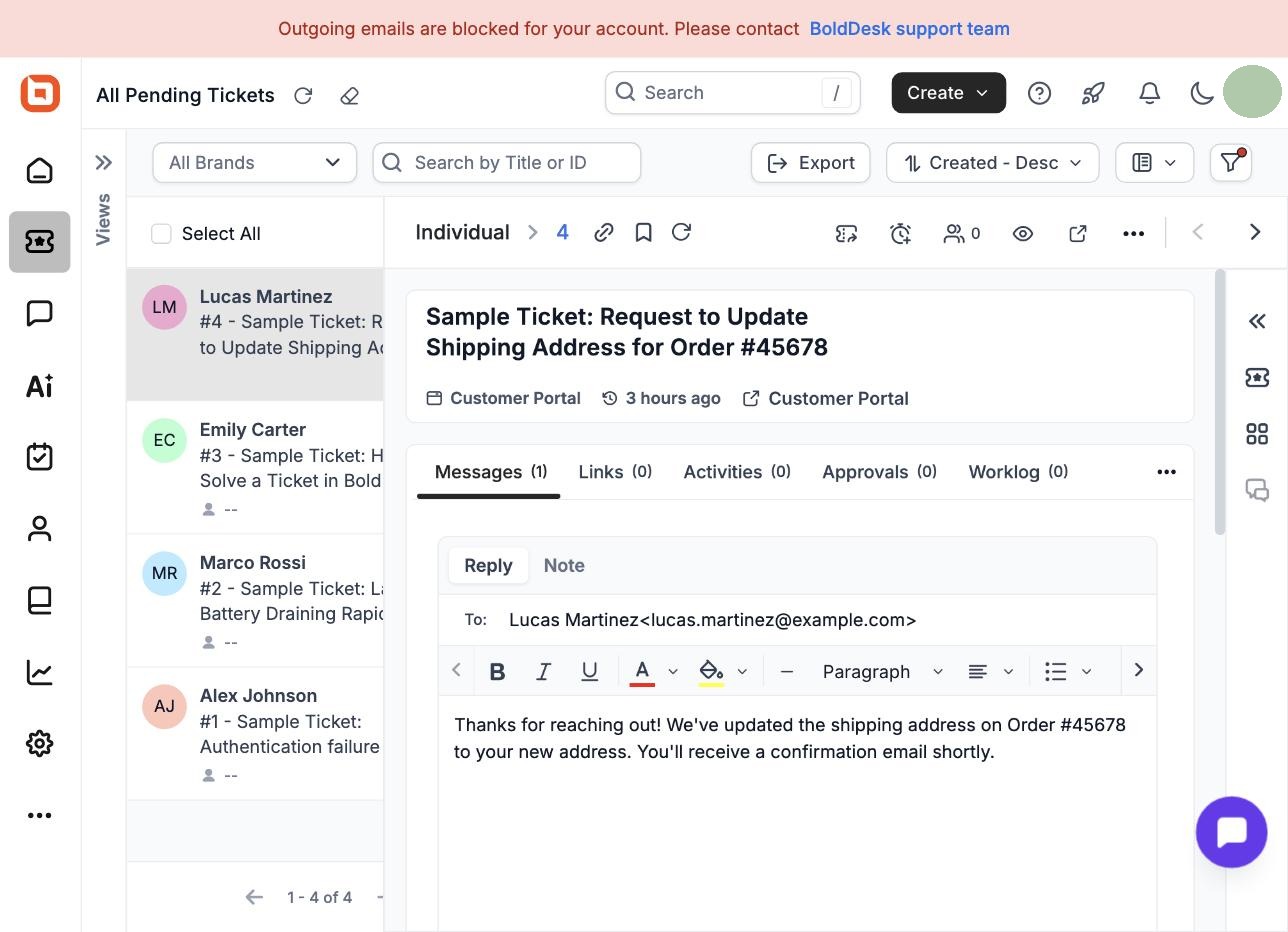
Opening a ticket in BoldDesk shows the full message thread alongside a reply/note composer with a genuine rich-text toolbar — bold, colors, lists, alignment — plus tabs for Links, Activities, Approvals, and Worklog. It reads as a complete ticket view rather than something visibly trimmed down for a trial account.
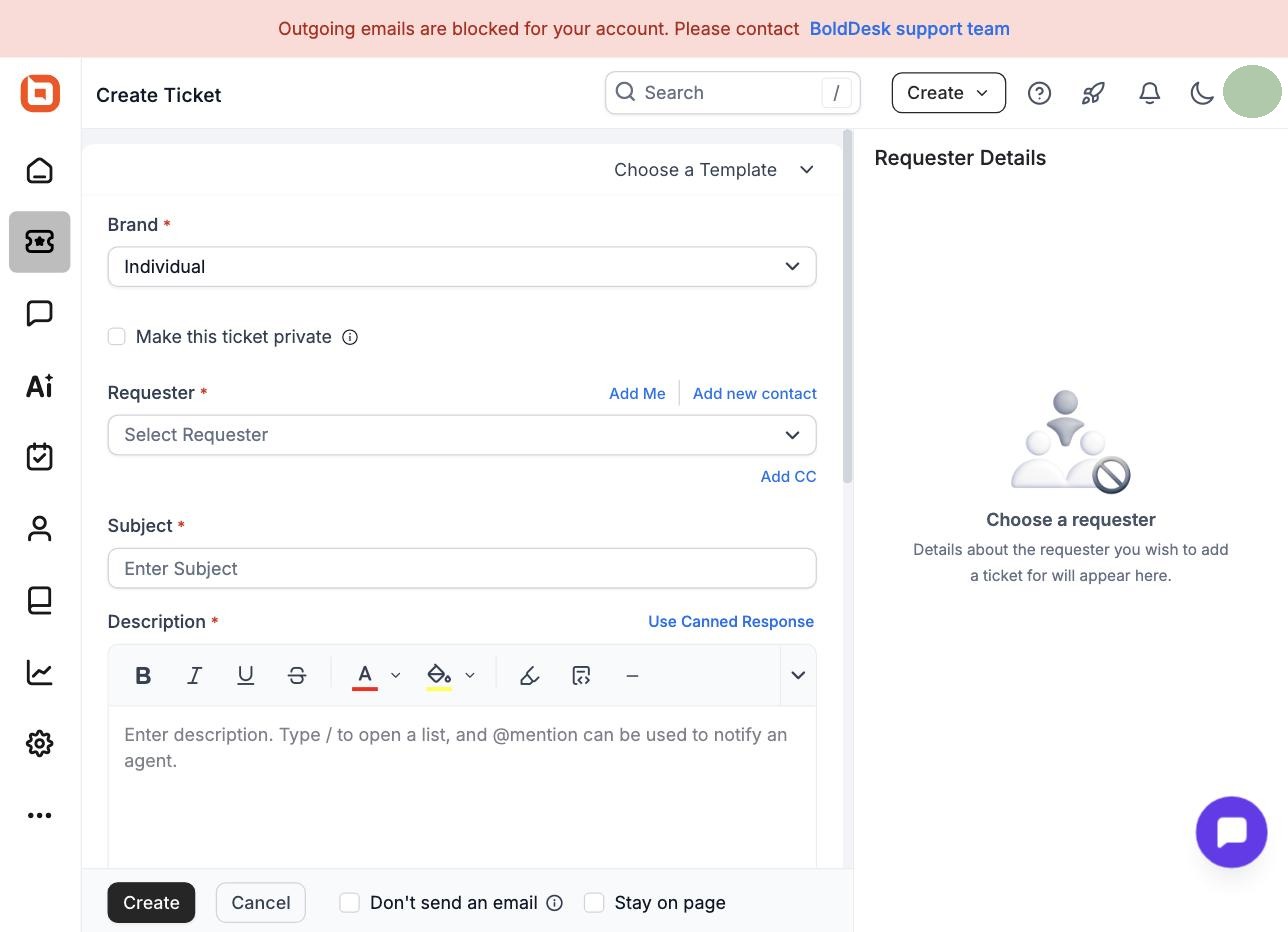
Creating a ticket from scratch offers brand selection, a requester lookup with an "Add new contact" shortcut, subject and description fields with canned-response support, and a "Choose a Template" option up top for repeatable ticket types — none of it required a trip to the documentation to figure out.
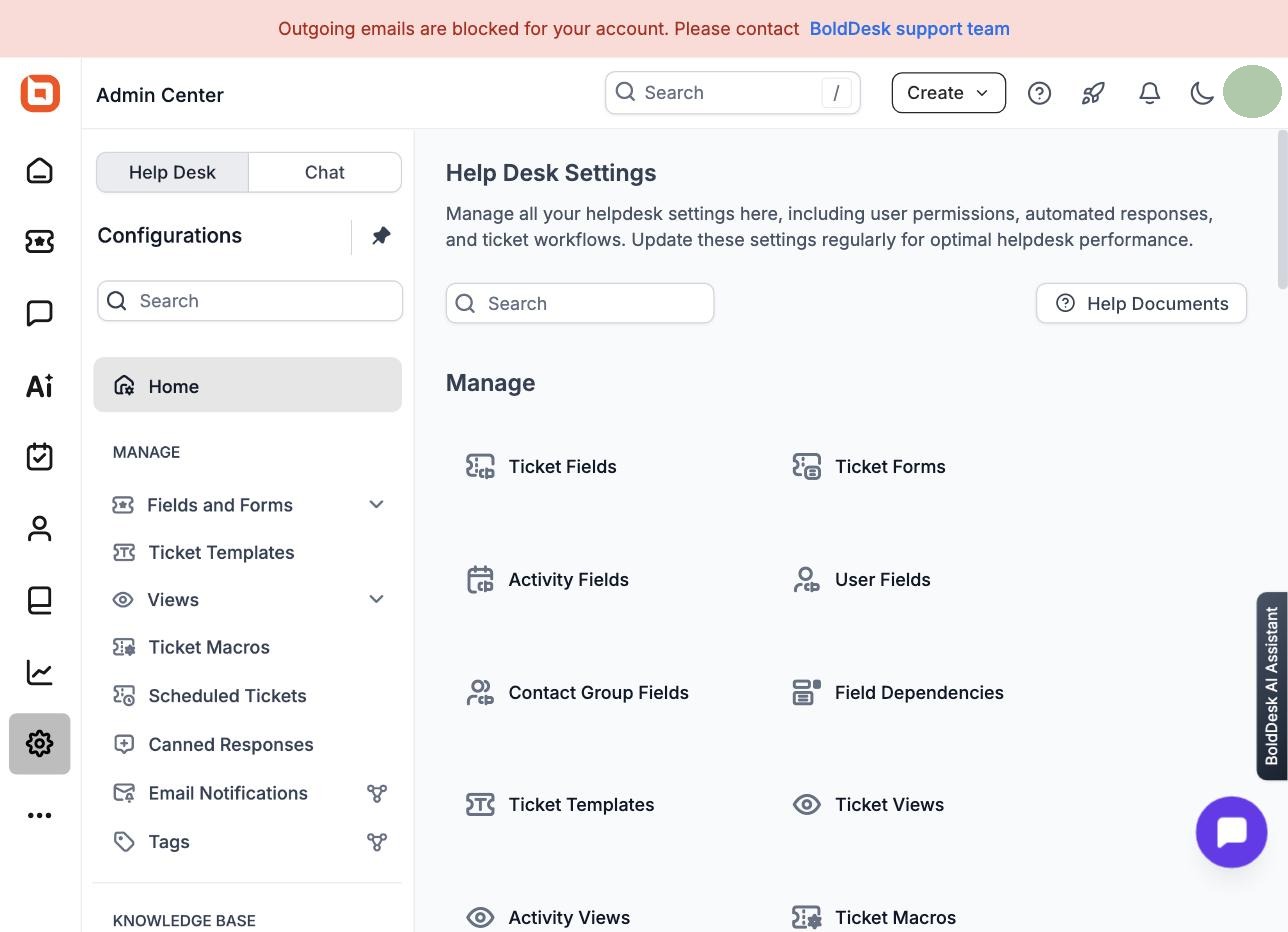
Admin-side, the settings surface is dense but organized: Ticket Fields, Ticket Forms, Ticket Templates, Ticket Views, Ticket Macros, Scheduled Tickets, and Canned Responses all live under one searchable "Help Desk Settings" home, with a separate "Chat" tab for BoldDesk's live-chat product. If BoldDesk's naming is unfamiliar coming from a Freshdesk background, Freshdesk's own documentation uses terms like "Dispatch'r" and "Workflows and Automations" for the equivalent territory — different vocabulary for broadly the same job, and worth a skim of each vendor's docs before you commit to either one's mental model.
On the affiliate side (disclosed above and in full on our How we test page), BoldDesk's public partner program pays 30% commission for a customer's first 12 months, with a 90-day cookie window. We haven't found a comparable affiliate program on Freshdesk's site; the Freshdesk link at the end of this article is a plain link to their pricing page, not a paid one. We're noting the BoldDesk rate for transparency, not as a reason to recommend it — our verdict above is based on the hands-on test.
Who should NOT buy BoldDesk
- Teams of one to four agents on a tight budget. BoldDesk's tier floor means you pay for 5 seats no matter how few people you actually have. Freshdesk Growth's true per-agent pricing (from $19/agent/month) will be cheaper until you cross 5 agents.
- Anyone planning to lean on the 500 monthly AI credits long-term. That allowance is a first-three-months offer per BoldDesk's own pricing page, not a permanent feature of the $99 tier — budget for what happens after month three before you build a workflow around it.
- Teams that need to test real outbound email delivery immediately during evaluation. New trial accounts start with outgoing email blocked by default; you'll need to contact BoldDesk support to lift that before you can validate email-based workflows end to end.
- Teams that need enterprise compliance features confirmed in writing (SOC 2 specifics, audit logs, IP whitelisting) before signing. Freshdesk documents these explicitly on its Enterprise tier; we did not find an equivalent public breakdown on BoldDesk's pricing page, so ask BoldDesk sales directly rather than assuming parity.
- Anyone who wants Freshdesk itself hands-on tested before deciding. We haven't completed our own Freshdesk trial yet — everything here about Freshdesk is sourced from their public docs and pricing page, not our own usage. Treat this article as a well-sourced starting point for your own Freshdesk trial, not a substitute for one.
Bottom line
If your team is under 5 agents and Freshdesk's Growth feature list covers what you need, its true per-agent pricing is going to be cheaper than BoldDesk's flat 5-agent floor — do that comparison first. If you're at 5 agents or more, or you know you need deep automation (200 rules) and a built-out AI toolset without paying a per-agent AI Copilot surcharge, BoldDesk's $99/month tier is a genuinely strong hands-on performer at a price that's close to Freshdesk's own entry tier. Whichever way you're leaning, read the fine print on both: BoldDesk's AI credits are a three-month offer, and Freshdesk's AI Copilot and deeper SLA controls both cost extra once you look past the list price. And if you want to see BoldDesk stacked against several other Freshdesk alternatives — including an AI-chat-first option we tested separately — our broader Freshdesk alternatives roundup covers five tools side by side, with the same hands-on-vs-docs labeling we've used here.